
YTI Gantt for Jira
Plan a Jira project on a Gantt chart
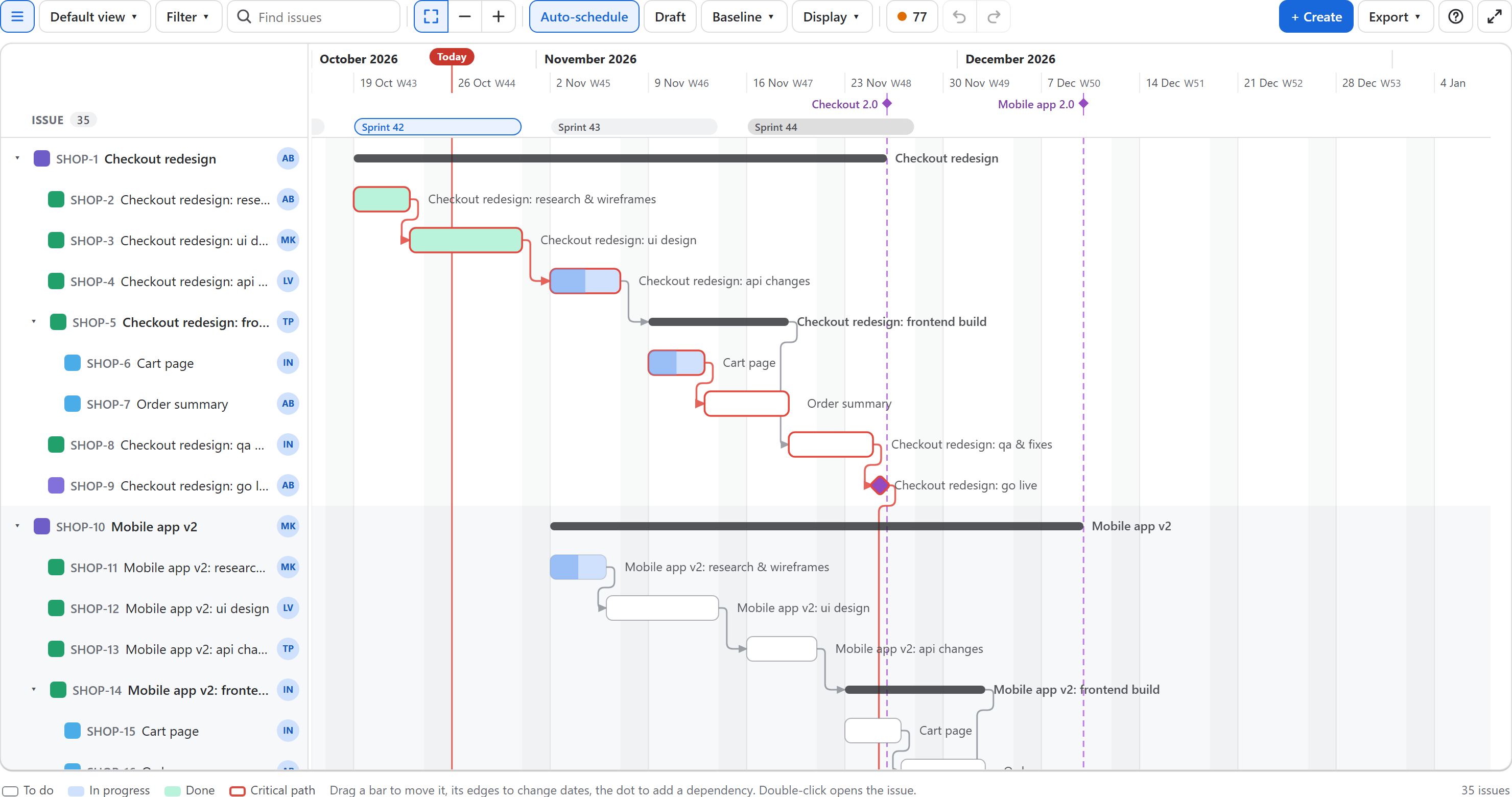
Every Jira project gets a Gantt tab. Epics, stories and subtasks sit on one timeline; drag a bar to change its dates, draw a dependency from its dot, and the change is saved to Jira as you.
In short
- Your Jira data, no copy. Bars come from each issue's start and due date fields, dependencies from Jira issue links. Change them on the chart and Jira has them at once.
- A scheduler, not only a picture. Four dependency types with lag, auto-scheduling, critical path, baselines, a draft to try changes in, and one-click fixes for broken dependencies and double bookings.
- Big plans. Up to 10,000 issues in one plan, across projects with JQL; only the rows on screen are drawn.
- Runs on Atlassian. No servers of our own: the app runs on Atlassian Forge, works as the person using it and stores only what Jira cannot hold.
New here? Your first plan in ten minutes walks through everything once, on your own project.
Get started
Install and open the chart →
Where the Gantt tab is, how the date fields are found, who can do what.
Your first plan in ten minutes →
Dates, dependencies, critical path, a baseline and a saved view, step by step.
Plan
Read the chart →
The list, bars, epics, milestones, releases, sprints, overdue issues and colors.
Zoom and find your way →
Zoom, the whole plan, today, search, filters, grouping, hide done, sort, full screen.
Move and schedule issues →
Drag, stretch, draw dates, type them in the list; undo and redo.
The details panel →
Rename, status, assignee, parent, dates, dependencies and new issues, all beside the chart.
Schedule issues without dates →
Give dates to many issues at once, from estimates or story points, in each person's free time.
Dependencies and auto-scheduling →
Four types, lag in working days, and what happens when a task moves.
Critical path and slack →
Which issues decide the finish date and how much room the others have.
Draft mode →
Try changes on the chart, review them, then publish them to Jira together.
Baselines →
Save the agreed dates and see what slipped, issue by issue.
Team and health
Workload and overlaps →
Working days per person and week, double bookings, and Resolve overlaps.
Plan health →
A score out of 100 and, point by point, what to fix.
Ask Rovo about the plan →
Ask what is at risk, move an issue with what follows it, or draft a plan from a description.
Work with the plan
Filters, views and links →
JQL across projects, saved views for the team, the portfolio page under Apps.
Open and create issues →
Jira's issue view inside the chart, new issues by drawing their dates, the schedule on each issue.
Export →
PNG and SVG images, CSV, and Microsoft Project XML.
Import from MS Project →
Turn an MS Project plan into Jira issues with their dates and dependencies.
Dashboard gadget →
A read-only timeline on a Jira dashboard.
Settings for Jira admins →
Date fields, milestones, dependency link types, working days and holidays.
Reference
Keyboard shortcuts →
Every key on the chart, in the details panel and in the list.
Limits and performance →
How many issues, how fast, and the limits of saved things.
Glossary →
Working day, lag, slack, baseline, variance, draft and the other terms.
Questions and answers →
Short answers about data, permissions, AI, imports and prices.
Coming from another Gantt app →
Your dates and links are already in Jira.
Permissions, data, licensing →
What the app reads, writes and stores, and who may use it.
Troubleshooting →
No Gantt tab, one-day bars, a refused date, a missing arrow.
Release notes →
What changed in each version.
English, German and Spanish: the chart follows each person's Jira language. Free for up to 10 users, then billed per user through the Atlassian Marketplace.