Guide · Project planning
How to find the critical path in Jira Cloud
The critical path is the chain of work that decides when a project finishes. If any issue on it slips, the finish date slips. Jira can show dependencies, but it does not tell you which chain that is.
What the critical path is
Take every chain of dependent issues from the start of the plan to its end. The longest one, counted in working days, is the critical path. Issues on it have no slack: they cannot slip a day without moving the finish date. Every other issue has some slack, the number of days it can move before it joins the critical path.
- It tells you where extra people or attention actually shorten the project.
- It tells you which delays matter today and which can wait.
- It changes as work moves: an issue with two days of slack becomes critical when it slips by three.
What Jira shows on its own
Jira's Timeline draws dependencies between issues and marks a dependency in red when the dates break it. Plans in Jira Premium adds dependencies across projects and teams. Neither works out the longest chain or the slack of each issue, so the critical path has to come from somewhere else.
Working it out by hand (small plans)
Make sure dependencies exist
Link issues that really wait for each other, for example with Blocks. Without links there is no chain to follow.Write down each issue's duration
In working days, from its start and due date.Go forwards
For each issue, its earliest start is the day after the latest finish among the issues it depends on.Go backwards
From the last issue, each issue's latest finish is the day before the earliest start among the issues that depend on it.Compare
Where earliest and latest dates are the same, the slack is zero: that issue is on the critical path.
Where it gets hard
With more than a dozen issues, holidays, start-to-start links or lag, a spreadsheet becomes fragile, and it is out of date the moment someone moves a due date in Jira.
Seeing it in Jira automatically
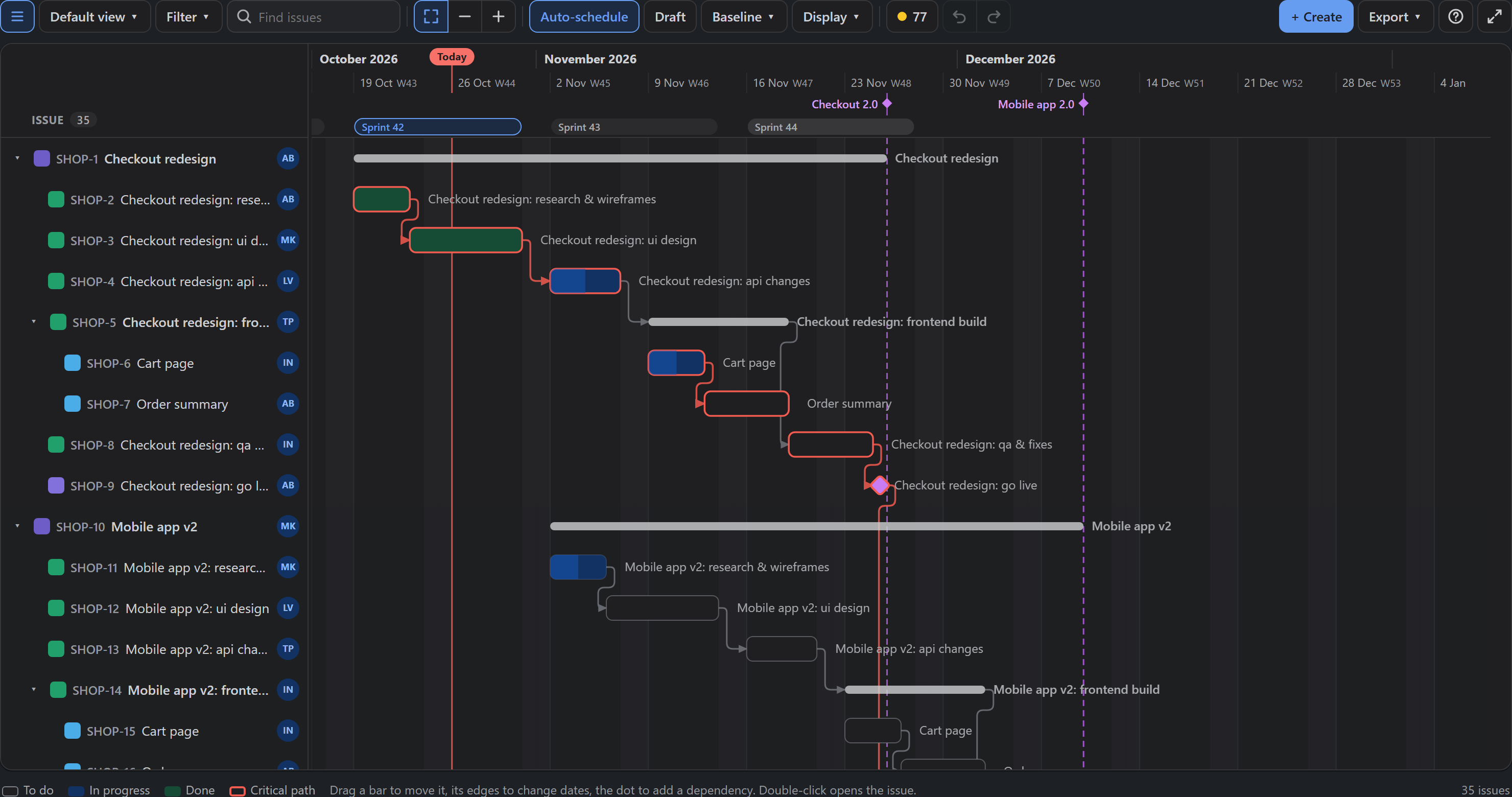
YTI Gantt for Jira (made by us, YTI Digital) runs the critical path method on the issues of a plan every time something changes, in working days of your calendar, with start-to-start, finish-to-finish and lag. Critical issues get a red outline and the dependencies between them turn red; hovering any bar shows its slack.
Read more in Critical path and slack, or see Gantt chart options in Jira Cloud.