
Plan
Critical path and slack
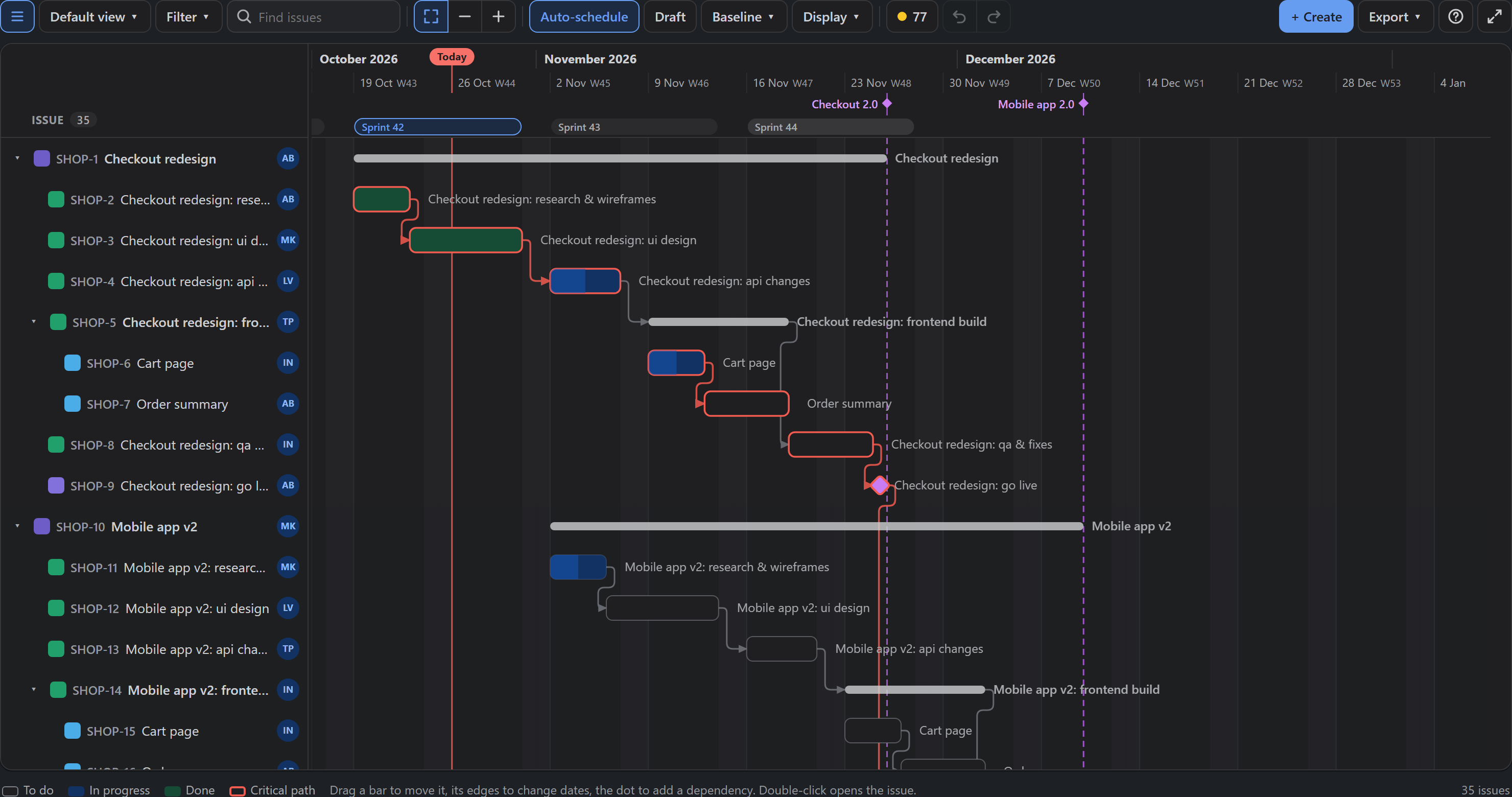
The critical path is the chain of issues that decides when the plan finishes. If any of them slips, the finish date slips with it.
How it is found
The app walks the dependencies forwards and backwards over the scheduled issues in the chart (the classic critical path method), in working days of your working calendar:
- The finish date of the plan is the latest end date among its issues.
- The slack (or float) of an issue is how many working days it could slip without moving that finish date.
- Issues with no slack are critical: their bars get a red outline, and the dependencies between them turn red.
Hover any bar to read its slack. A negative number ("3 days behind") means the issue already starts too late for a dependency; Plan health lists those.
Reading it well
- The path follows dependencies, so it is only as good as they are. Issues that run one after another without a link do not form a chain; link them to see it.
- Parents (epics, stories with subtasks) take part through their issues, never as a bar of their own.
- The path is worked out for the issues in the current filter. A narrower filter can give a different path.
Turn the highlight on or off in Display → Critical path; it is saved with a view.