
Team
Plan health
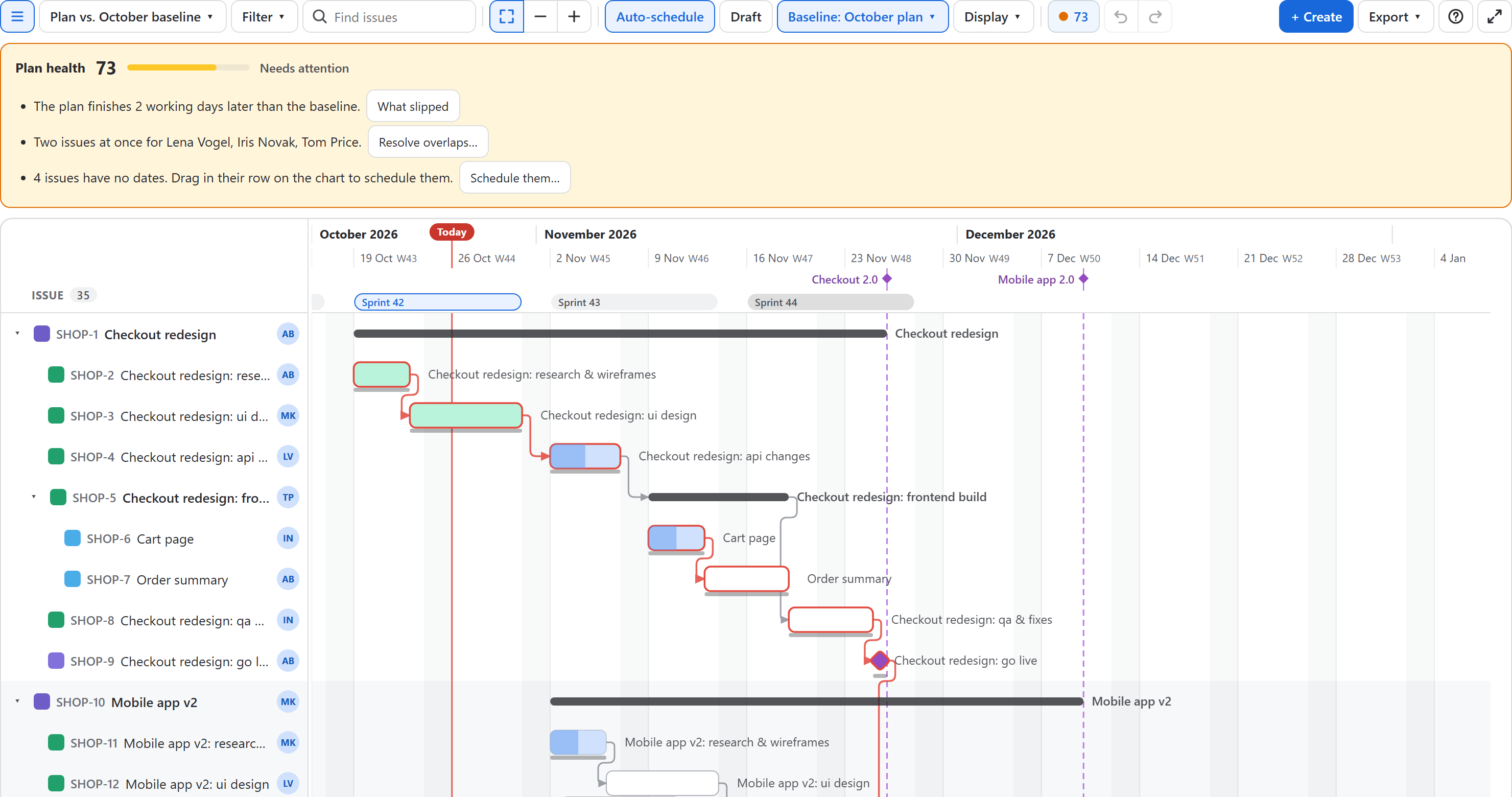
One number for how sound the plan is, and a list of what to fix. The dot and the score are in the toolbar; click them for the details.
The score
Every plan starts at 100. Each kind of risk takes points off, up to a limit, so one long list cannot hide everything else. The levels:
| Score | Level | Dot |
|---|---|---|
| 85 – 100 | Healthy | Green |
| 60 – 84 | Needs attention | Amber |
| 0 – 59 | At risk | Red |
What costs points
| Risk | Points off | Fix |
|---|---|---|
| Broken dependencies: an issue starts too early for what it waits for | 6 each, up to 30 | Move it on its line, or Move them all |
| Circular dependencies | 15 | Remove one of the links in the loop |
| The plan finishes later than the baseline shown | 2 per working day, up to 20 | What slipped lists the issues by how late they end |
| Overdue issues: past their end date and not done | 4 each, up to 25 | Click one to go to it; move it or finish it |
| People with two issues at once | 7 per person, up to 20 | Resolve overlaps… |
| Critical issues nobody is assigned to | 4 each, up to 15 | Click one and choose its assignee |
| Issues without dates | Up to 15, by their share of the plan | Schedule them… |
The baseline counts only while one is shown (Baseline menu). The critical path counts even when it is not drawn. Parents and milestones are not counted twice.
Fixing from the panel
- Move it moves an issue that starts too early to the first day its dependencies allow, and pushes what follows. Move them all does it for every broken dependency in one step.
- What slipped opens the baseline comparison (see Baselines).
- Resolve overlaps… spreads each person's work out (see Workload and overlaps).
- Schedule them… gives dates to what has none (see Schedule issues without dates).
- Keys in the list go to the issue on the chart.
Every fix is one step on the chart: Undo takes it back, and in draft mode it goes into the draft.
The same number everywhere
The Rovo agent uses the same calculation, so "how healthy is the plan of SHOP?" in Rovo gives the score you see on the chart (without a baseline, which is chosen on the chart).