
Work with the plan
Export
Take the schedule to a slide, a spreadsheet or another planning tool. Everything is under Export in the toolbar.
CSV
Open Export and choose Download CSV for a file, or Copy as CSV to paste into Excel or Google Sheets. The export follows the rows on screen: the current filter, search, grouping and collapsed parents. One row per issue:
| Column | Contains |
|---|---|
| Key, Summary, Type, Status, Assignee, Parent | As in Jira |
| Start, End | YYYY-MM-DD; for parents, the span of their issues |
| Working days | Duration in working days of your calendar |
| Progress % | 100 for done issues, otherwise from time tracking |
| Slack (working days) | How far the issue can slip without moving the finish date |
| Critical | yes for issues on the critical path |
| Predecessors | Keys of the issues it depends on, with type and lag when not plain finish-to-start, e.g. SHOP-4 SS+2d |
The file is UTF-8 with a byte-order mark, so Excel opens names in any language correctly. Slack and Critical are filled when the critical path is on (Display → Critical path).
Tip: for a status e-mail, apply a filter such as one release, collapse the epics you don't need and copy the CSV.
Image (PNG or SVG)
Download image (PNG) or (SVG) saves the plan as one picture for a slide, a wiki page or a status e-mail: the issue list with dates, the date header, bars, dependencies, the critical path, the baseline and releases if they are shown, and today's line.
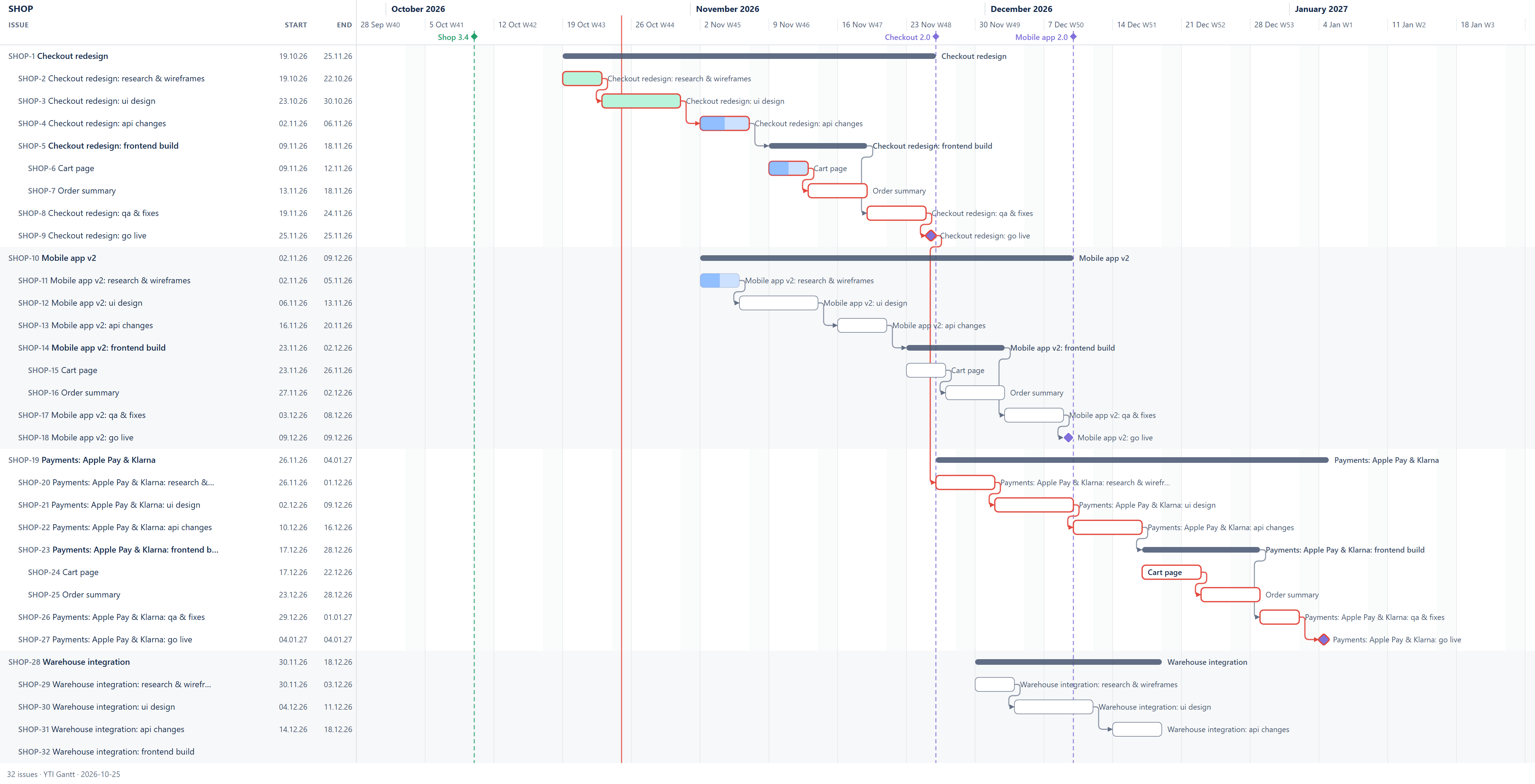
- It includes every row as it is on screen (filter, search, grouping, collapsed parents) and every date of the plan, not only the part you scrolled to.
- The zoom decides the width: Month or Quarter for a whole-year overview, Week for detail.
- PNG is ready to paste anywhere; SVG stays sharp at any size and prints well. Up to 1,000 rows.
Microsoft Project XML
Download MS Project XML saves the whole plan (every issue of the current filter, whatever is collapsed or searched) as a Microsoft Project XML file (MSPDI), the format Microsoft Project and many other planning tools import.
- The hierarchy becomes the outline (epics, stories, subtasks), with the issue key at the start of each task name and a link back to the issue.
- Start and finish dates, milestones and progress, with each task set to start no earlier than its date in Jira.
- Dependencies with their type and lag; links to issues outside the plan are left out.
- A calendar with your working days and holidays; a working day is 8 hours.
- The file can be imported back after you rework the dates in MS Project: tasks keep their keys, so the issues are updated, not created again (see Import from MS Project).
The export is one way: changes made in the file do not come back to Jira.