
Use Revenue Impact
Tell the deal owner when it's done
The customer asked for it, sales promised it, engineering shipped it — and nobody told the customer. With this switched on, the deal owner gets a HubSpot task the moment the issue is done.
What happens
- An issue with HubSpot links moves into a status of the Done category (Done, Closed, Resolved — whatever your workflow calls it).
- Revenue Impact finds the open deals behind it: deals linked to the issue, plus — when Count the open deals of linked customers is on — the open deals of its customers. The same deals as in the issue's Linked open deal value.
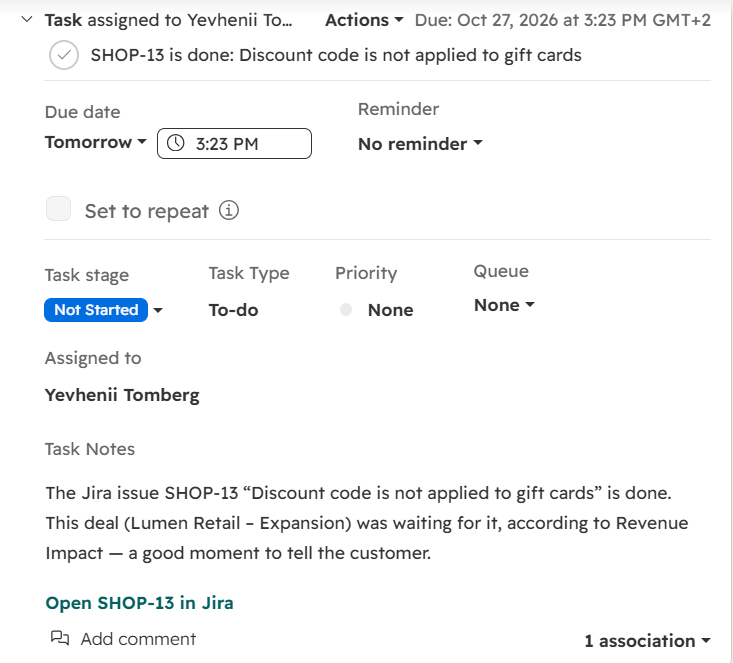
- The owner of each of those deals gets a HubSpot task on the deal, due the next day: “SHOP-13 is done: Discount code is not applied to gift cards”, with a short note and a link to the issue.
Switch it on
Open Atlassian Administration → Connected apps → ••• next to Revenue Impact → Configure
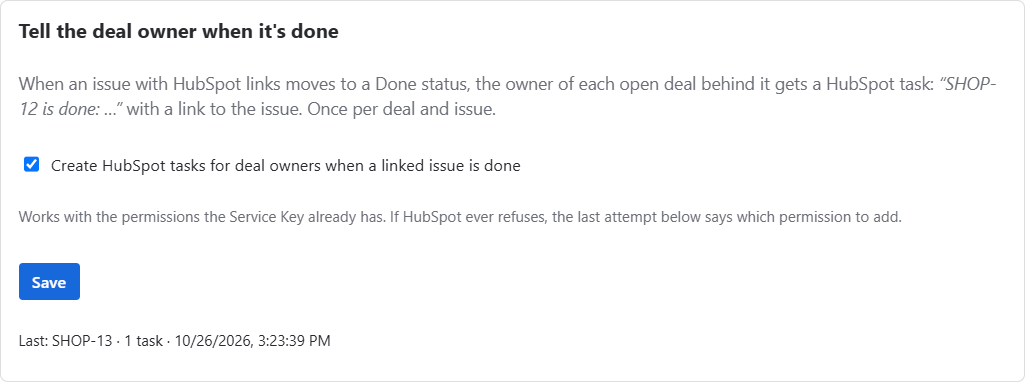
Jira administrators only.Under Tell the deal owner when it's done, tick the box and choose Save
It is off until you switch it on. The counting settings and the numbers are not affected.
The rules
| Case | What Revenue Impact does |
|---|---|
| The issue is reopened and done again | Nothing new: each deal is told once per issue |
| A deal is added later (or gets an owner), then the issue is done again | Only that deal's owner gets a task |
| A deal behind the issue has no owner | No task for it; the admin page says how many deals had nobody to tell |
| Closed deals (won or lost) | Never get a task |
| The issue has no HubSpot links | Nothing happens |
| Moved to Done by an automation or another app | Same as by a person: any change into a Done status counts |
The card on the admin page shows the last notice — the issue, how many tasks were created and when — or why the last attempt did not create any.
HubSpot permissions
Tasks are created with the permissions your Service Key or private app token already has (checked with a read-only key). If HubSpot ever refuses, the admin page shows the permission HubSpot asked for; add it to the key and the next issue that is done tries again. See Permissions, data, licensing.