
Revenue Impact for Jira
The HubSpot revenue behind every Jira issue
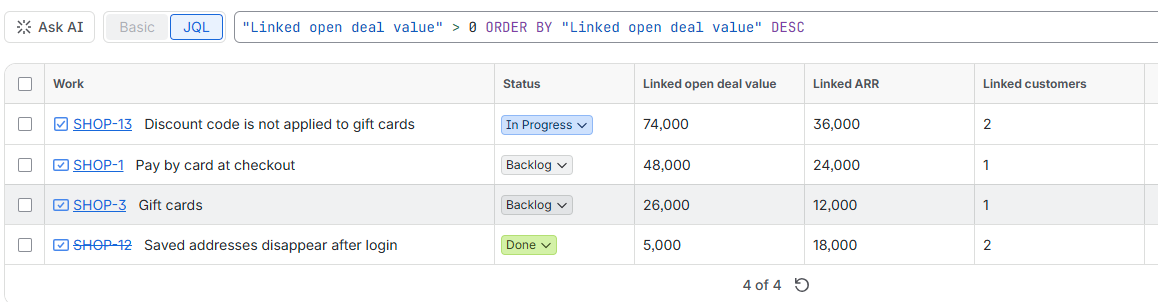
Link the customers, deals and tickets behind a feature request or bug. Every issue shows its open deal value, ARR and how many customers are waiting, and you can sort your backlog by them.
What it does
- Link HubSpot records to issues. Search companies, deals and tickets from the issue and link them in one click.
- See the money on the issue. Open deal value, ARR and number of customers, with every linked record one click away in HubSpot.
- Sort and filter in JQL. Three read-only fields —
Linked open deal value,Linked ARRandLinked customers— work in filters, boards and dashboards. - Follows associations. Link a ticket or a deal and the customer behind it counts, with that customer's other open deals and won revenue.
- No copy of your CRM. The HubSpot key stays in Atlassian's Forge storage; the app has no servers of its own and stores only which records are linked to which issue.
Free for up to 10 users, then billed per user through the Atlassian Marketplace.
Start here
Install and connect HubSpot →
Two minutes: create a Service Key in HubSpot and paste it into the app.
Link records to an issue →
Search, link and unlink companies, deals and tickets.
Sort and filter with JQL →
Ready-made queries to put the most valuable work first.
How the numbers are counted →
Exactly what open deal value, ARR and customers mean.