
Use Revenue Impact
Revenue at risk gadget
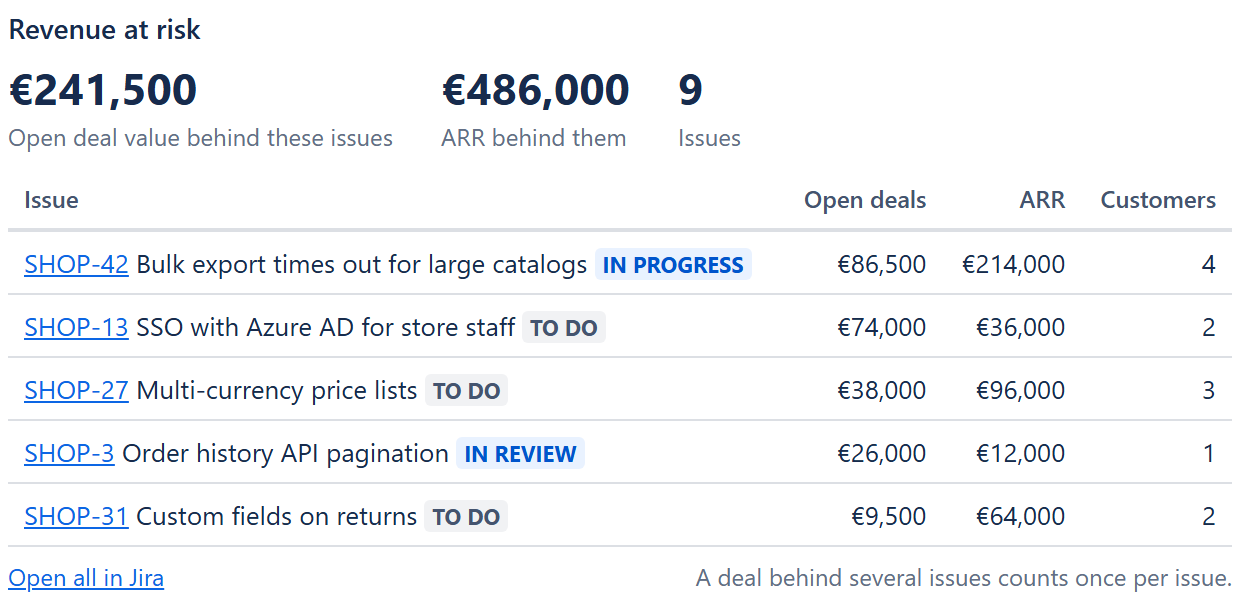
The open issues with the most HubSpot revenue behind them, on any Jira dashboard: for the weekly prioritisation meeting, a product lead's home page or a wallboard.
Add it to a dashboard
Open a dashboard
In Jira, go to Dashboards, open one you can edit (or create one) and choose Edit.Add the gadget
Choose Add gadget, search for Revenue at risk and choose Add.Set it up
Pick which issues to look at and how to sort them, then choose Save.
Settings
| Setting | What it does |
|---|---|
| Title | Optional heading above the list. |
| Which issues (JQL) | Optional filter, for example project = SHOP AND type = Bug. Empty means every project you can see. Jira checks the query before saving. |
| Biggest first by | Linked open deal value, Linked ARR or Linked customers. Only issues with a value above zero in that field are listed. |
| Show | 5, 10, 15 or 20 issues. |
| Only issues that are not done | On by default: done issues are left out, so the list shows revenue still waiting on your team. |
What it shows
At the top: the open deal value and ARR behind the issues, and how many issues match. Below: the issues, biggest first, with their status and the three numbers. Open all in Jira opens the same search in the issue list.
A deal can sit behind several issues
The totals add up the issues' fields, so a deal linked (directly or through its customer) to two issues counts once for each of them. Each issue's own numbers count every deal once, as described in how the numbers are counted.
Who sees what
The gadget searches as the person looking at the dashboard, so everyone sees only the issues they may see in Jira. The numbers come from the app's fields, which update every hour and whenever links change.