
Use Revenue Impact
Link records to an issue
Link the customers who asked for a feature, the deals that depend on it, or the support tickets behind a bug.
Open the panel
On any issue, open Revenue impact in the details on the right (or add the Revenue impact panel from the issue's apps menu).
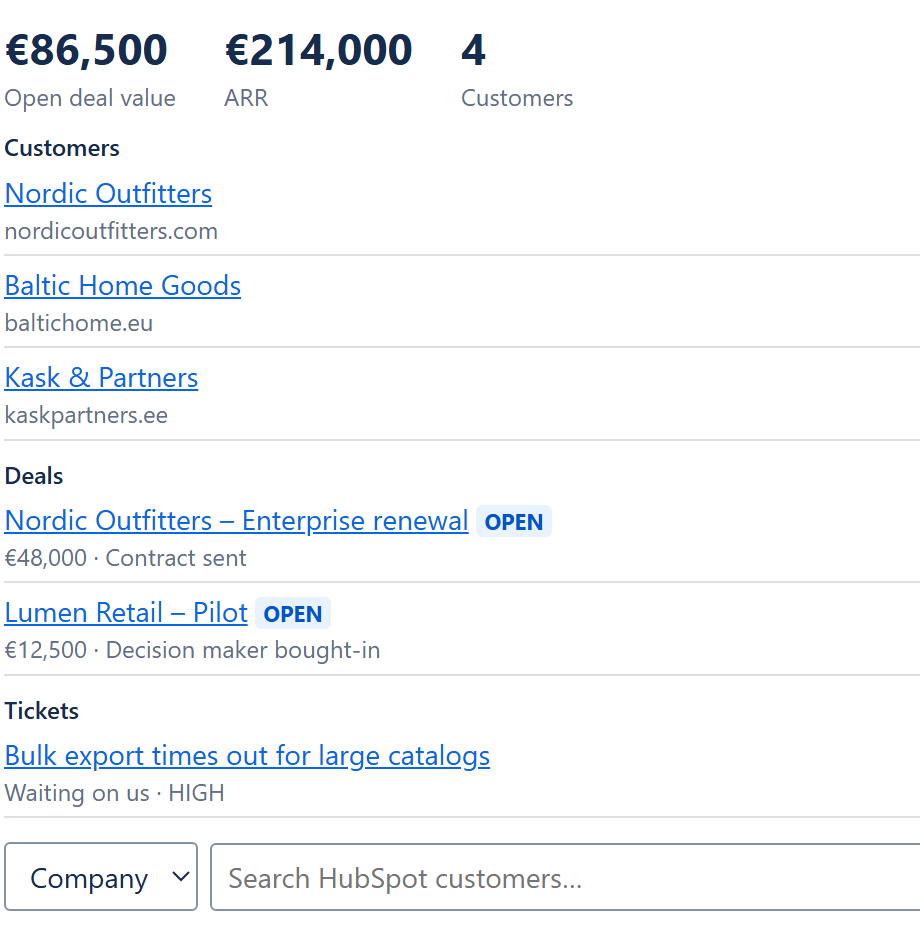
Link a record
Choose the type
Company, Deal or Ticket.Search
Type at least two letters of the name. Results come straight from HubSpot.Link
Choose Link. The totals and the issue fields update at once.
What you see per record
- Companies: name and domain.
- Deals: amount, pipeline stage and whether the deal is open, won or lost.
- Tickets: status and priority.
Every name opens the record in HubSpot in a new tab.
Unlink
Choose × next to a record. When the last record is unlinked, the three fields on the issue are cleared.
Who can link
Anyone who can see the issue sees the panel. Linking and unlinking need permission to edit the issue. An issue can link up to 50 records of each type.