
Test results
Upload CI results
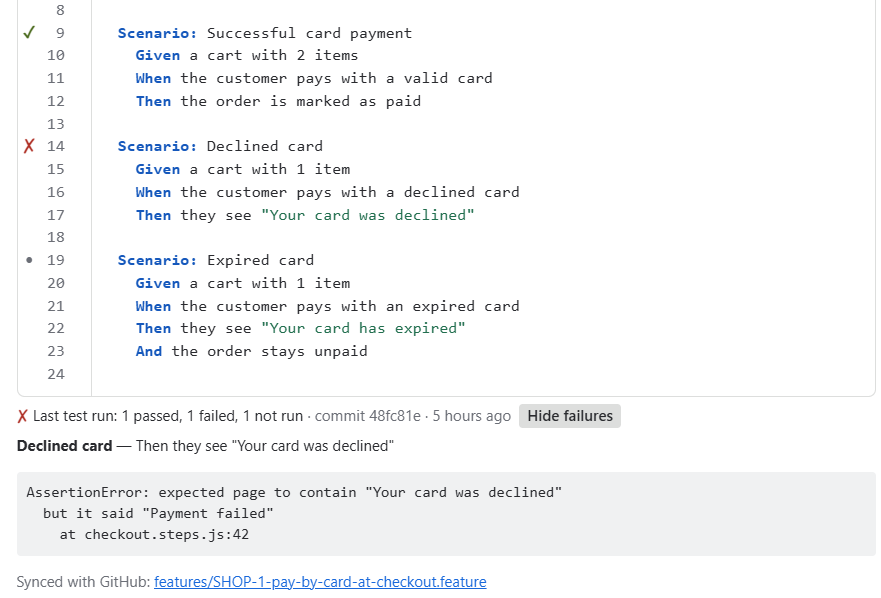
After your tests run, send the Cucumber JSON report to FeatureBridge. Each scenario then shows its last result on the issue.
1. Create an upload key
Open Jira settings → Apps → FeatureBridge and scroll to Test results from CI.
Click Create an upload key.
The key is shown once, together with the upload URL and a ready-made command. Save both as secrets in your CI.
Keep the key secret
Anyone with the key can upload results to your site. Creating a new key replaces the old one.
2. Write a Cucumber JSON report
Any tool that writes the Cucumber JSON format works. For example:
| Tool | How |
|---|---|
| cucumber-js | --format json:cucumber.json |
| Cucumber-JVM | plugin = "json:target/cucumber.json" |
| Other Gherkin tools | Use their Cucumber JSON formatter or plugin. |
3. Upload it
curl -X POST \
  -H "X-API-KEY: $FEATUREBRIDGE_KEY" \
  -H "X-COMMIT-ID: $GIT_COMMIT" \
  --data-binary @cucumber.json \
  "$FEATUREBRIDGE_URL"
X-COMMIT-ID is optional; it is shown next to the result. A successful upload answers 202 with the number of scenarios received.
GitHub Actions
- name: Send results to FeatureBridge
  if: always()
  run: |
    curl -sS -X POST \
      -H "X-API-KEY: ${{ secrets.FEATUREBRIDGE_KEY }}" \
      -H "X-COMMIT-ID: ${{ github.sha }}" \
      --data-binary @cucumber.json \
      "${{ secrets.FEATUREBRIDGE_URL }}"
GitLab CI
after_script:
  - >
    curl -sS -X POST
    -H "X-API-KEY: $FEATUREBRIDGE_KEY"
    -H "X-COMMIT-ID: $CI_COMMIT_SHA"
    --data-binary @cucumber.json
    "$FEATUREBRIDGE_URL"
Run the upload even when tests fail (if: always(), after_script), otherwise failures never reach Jira.
How results find their issue
- By an issue-key tag on the feature, such as
@SHOP-12, or - by the issue key in the feature file name, such as
SHOP-12-checkout.feature.
Within an issue, results are matched to scenarios by name. Each upload replaces the previous results of the issues it contains. Reports up to about 4 MB per upload are accepted; split larger ones.
Coming from Behave Pro?
Its upload headers (X-API-KEY, X-COMMIT-ID, PUT) are accepted: only change the URL and the key.