
Overview
FeatureBridge documentation
FeatureBridge keeps BDD scenarios on Jira issues and the Gherkin .feature files in your Git repository as one source of truth, and shows the last test result of every scenario.
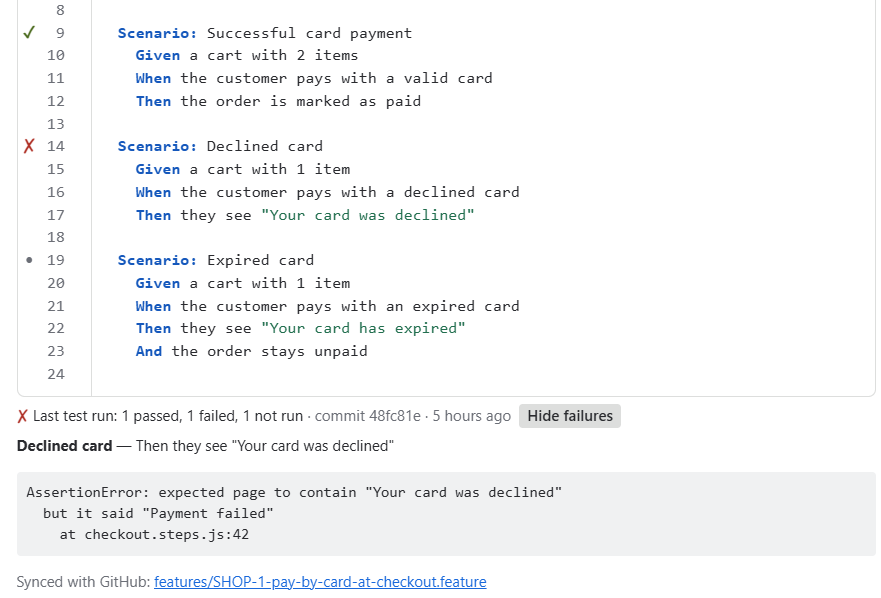
What you can do
- Write and edit scenarios right on the issue, with syntax highlighting and errors explained in plain words.
- Keep them in two-way sync with
.featurefiles in GitHub, GitLab or Bitbucket. Nothing is ever overwritten silently. - Upload the Cucumber JSON report from CI and see ✓ passed / ✗ failed next to each scenario.
- See every feature of a project, its test status and its file, on one page.
- Move over from Behave Pro or from existing
.featurefiles in minutes.
Start here
Install and set up →
Install the app, show the Scenarios panel on every issue and write your first scenario.
Connect Git →
How two-way sync works, and step-by-step guides for GitHub, GitLab and Bitbucket.
Show test results →
Send the Cucumber JSON report from GitHub Actions, GitLab CI or any other pipeline.
Import scenarios →
Bring in a Behave Pro export, plain .feature files or the files already in your repository.
Free for small teams
FeatureBridge is free on Jira sites with up to 10 users. See licensing.
Need help?
Check Troubleshooting or email support@yti.digital. We reply on business days, usually within one day.