
Use Chatline
What messages look like
Each change is a Google Chat card with the issue, what changed, who changed it and an Open in Jira button.
New issues
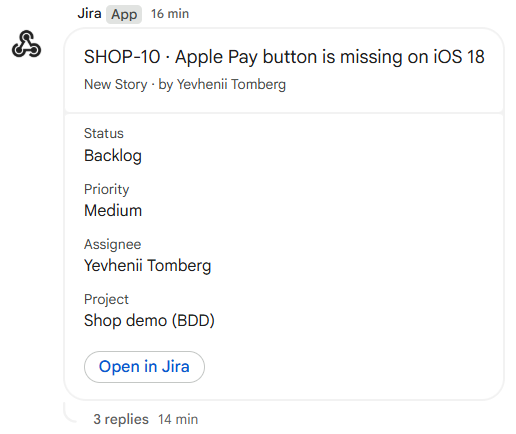
- Title: the issue key and summary.
- Change line: the issue type and who created it.
- Facts: status, priority, assignee, project and the extra fields you chose.
- Open in Jira: opens the issue.
Updates, in the issue's thread
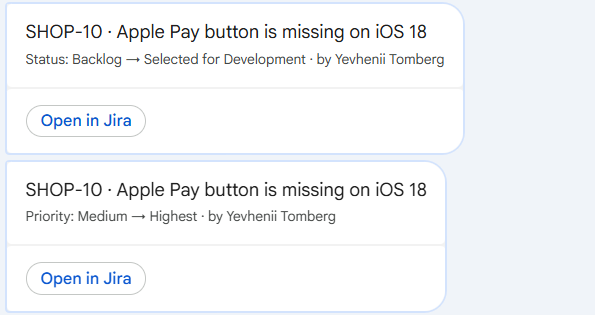
| Change | Line |
|---|---|
| Status | Status: To Do → In Progress · by Ana Silva |
| Resolved | Resolved as Done |
| Assignee | Assigned to Jo Park (was Unassigned) |
| Priority | Priority: Medium → High |
| Other fields | Due date: 2026-11-01 → 2026-11-08 |
With bundling on, quick edits of one issue arrive as one message: the first change in the title line and the others below it, with everyone who made them.
Comments
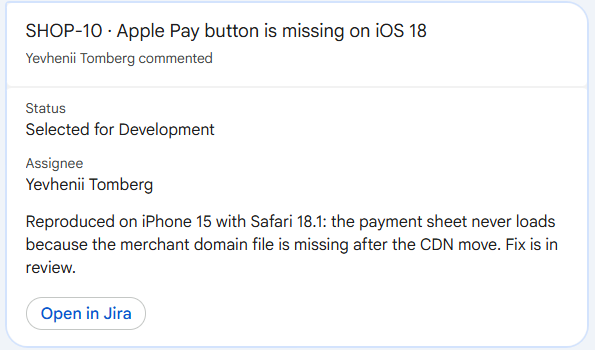
The comment text (up to 400 characters) is included unless you turned that off. Open in Jira opens the comment itself.
Sprints
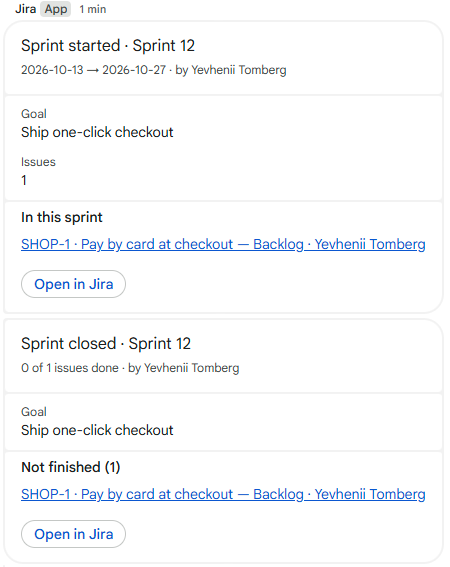
When a sprint starts: its dates, goal, number of issues and the first issues. When it is completed: how many issues were done and which were not finished. Only issues that match the space's filter are counted and listed.
Releases
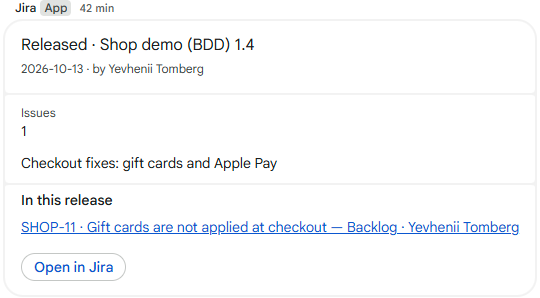
When a version is released: the project and version, release date, description and the issues in it.
Text from Jira is shown as text
Summaries, comments and field values are shown literally. Text such as <users/all> in an issue cannot mention people in the space or turn into a link.
Delivery
Messages are usually posted within a few seconds (bundled edits a minute after the last edit). Google Chat accepts one message per second per space; during a burst (for example a bulk edit) Chatline waits and retries for up to about 15 minutes, so messages may arrive a little later and out of order.