
Use Chatline
Daily digest
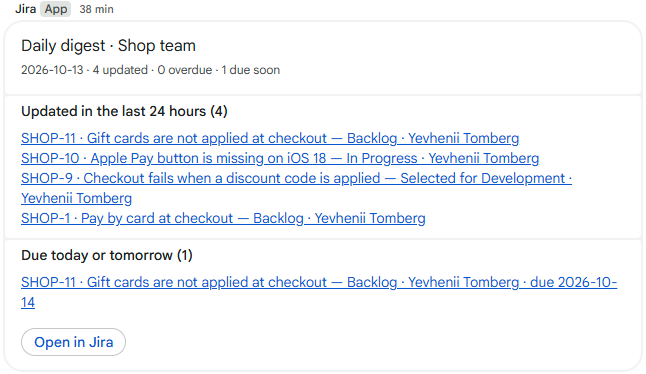
One message a day per space: what changed, what is overdue and what is due soon. Good for stand-ups and for spaces that should not get every update.
Turn it on
On the Chatline settings page click Edit on the space.
Under Daily digest tick Post a daily digest.
Choose the hour and the time zone of the team. Weekdays only is on by default.
Click Save changes. The card shows Daily digest at 09:00 Europe/Berlin, weekdays.
What is in it
- Updated in the last 24 hours: issues that changed, newest first.
- Overdue: unfinished issues whose due date has passed.
- Due today or tomorrow: unfinished issues due soon.
Each list shows up to eight issues with a link, and how many more there are. Only issues that match the space's JQL filter are included, and issues with a security level are left out when that option is on. On a day with nothing to report, nothing is posted.
When it arrives
Chatline checks every five minutes, so the digest arrives within the first few minutes of the chosen hour, once a day. Daylight saving time is followed by the chosen time zone.