Guide · BDD with Jira
Given/When/Then acceptance criteria in Jira
“Done when it works” is not an acceptance criterion. Given/When/Then turns a story into examples the whole team reads the same way — and that a test runner can execute. Here is how to write them well and where to keep them in Jira.
The format in one minute
- Given — the situation before anything happens (state, data, who the user is).
- When — the one action or event the story is about.
- Then — what must be true afterwards, as something you can check.
- And / But continue the step above them. A Scenario is one example; a Feature groups the scenarios of one story.
This is Gherkin, the language Cucumber, SpecFlow, Behave and other BDD tools read. Written this way, the same text is the acceptance criteria for the product owner and the test for the developer.
A worked example
Story: As a shopper I want to pay by card so that I can finish checkout.
@SHOP-12 @checkout
Feature: Pay by card at checkout

  Background:
    Given a cart with 2 items worth 40 EUR

  Scenario: Successful card payment
    When the shopper pays with a valid card
    Then the order is confirmed
    And the shopper gets a confirmation e-mail

  Scenario: Declined card
    When the shopper pays with a card that is declined
    Then the order is not placed
    And the shopper sees "Your card was declined"

  Scenario Outline: Minimum order value
    Given a cart worth <total> EUR
    When the shopper opens the payment step
    Then card payment is <allowed>

    Examples:
      | total | allowed     |
      | 4.99  | not offered |
      | 5.00  | offered     |
Rules that keep scenarios useful
| Do | Instead of |
|---|---|
| Describe behaviour: “the shopper pays with a valid card” | Describe clicks: “click #pay-button, type 4242…” |
| One When per scenario | Several actions chained with And — that is several scenarios |
| Then states an outcome someone can check | Then “it works” or “the page is correct” |
| 3–7 steps per scenario | One giant scenario that walks through the whole app |
| Background for what every scenario shares | Copying the same Given into each scenario |
| Scenario Outline + Examples for the same rule with different numbers | Five nearly identical scenarios |
| Write them with the product owner, a tester and a developer (“three amigos”) before coding | A developer writing them after the code is done |
Where to keep them in Jira
- In the description. Easy to start, but there is no Gherkin highlighting or check, the criteria mix with the rest of the text, and the test code can't read them — someone copies them into the repository by hand.
- In a separate multi-line field. Tidier, the same limits.
- Only in Git as .feature files. The tests run them, but the product owner reviewing the story never sees them.
- On the story, synced with Git. The scenarios sit on the issue for review, and the same text is the .feature file the tests run. That is what FeatureBridge (made by us) does.
With FeatureBridge
FeatureBridge adds a Scenarios panel to Jira issues: Gherkin with highlighting, checked as you type, with every save versioned — and, once a repository is connected, committed to GitHub, GitLab or Bitbucket as a .feature file.
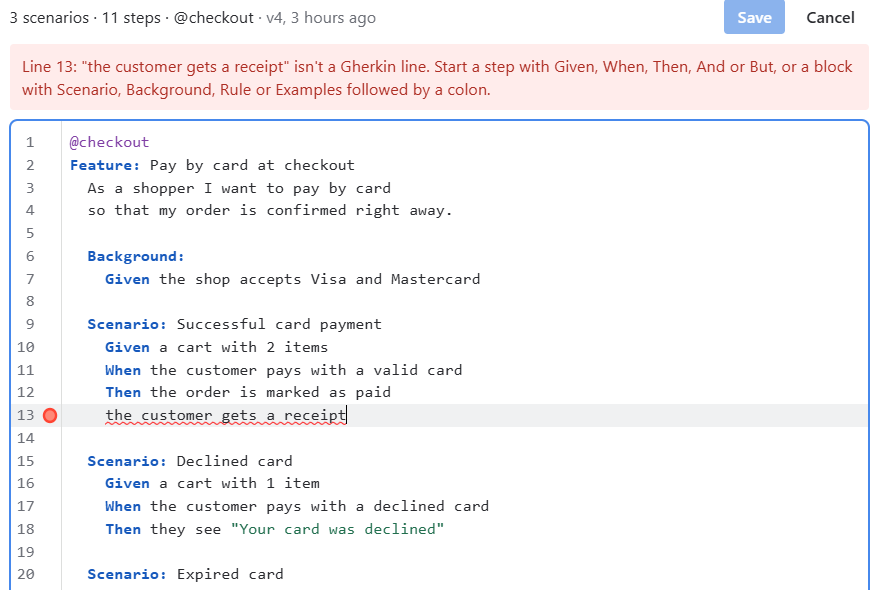
- Mistakes are explained in plain words (a line that isn't a step, a table row with the wrong number of cells), and Save waits until the text is valid.
- A tag with the issue key (
@SHOP-12) or the key in the file name ties the scenarios to the story. - After CI runs, each scenario shows whether it passed: see Show Cucumber test results on Jira issues.
Coming from Behave Pro or Cucumber for Jira
Existing feature files and scenarios can be imported: see Import scenarios.
Read more: Write scenarios · Keep Gherkin feature files in Git and edit them in Jira · FeatureBridge.