Guide · BDD with Jira
Show Cucumber test results on Jira issues
The scenarios of a story run in CI on every push, but the story in Jira doesn't say which of them pass. Here is what Jira shows on its own, a workaround with Automation, and how to get a result next to every scenario.
What Jira shows on its own: the build, not the scenarios
Connect GitHub, GitLab, Bitbucket Pipelines or Jenkins to Jira, mention the issue key in the branch name or commit message, and the Development panel of the issue lists the builds: passed or failed. That answers "is the pipeline green?", not "which acceptance criteria fail?". One failing scenario in a run of 300 turns the whole build red, and the issue doesn't say which one.
Workaround: an Automation rule with an incoming webhook
Jira Automation can start a rule from a web request. CI posts a short summary, the rule adds a comment to the issue:
- Create a rule with the Incoming webhook trigger; Jira gives you a URL and a secret.
- After the tests, a CI step counts passed and failed scenarios per issue key and posts them.
- The rule adds a comment such as "12 passed, 1 failed" using
{{webhookData}}.
curl -X POST "$JIRA_AUTOMATION_URL" \
  -H "X-Automation-Webhook-Token: $JIRA_AUTOMATION_SECRET" \
  -H "Content-Type: application/json" \
  -d '{"issues":["SHOP-12"],"passed":12,"failed":1,"commit":"'"$GIT_COMMIT"'"}'
It works, but you write and maintain the script that reads the Cucumber report, every run adds another comment, and a reader still has to match the failure to a scenario by hand.
Test-management apps
Xray, Zephyr and similar apps import Cucumber JSON into test executions. They fit teams that need test plans, coverage reports and audit trails. The cost is a second model: every scenario becomes a test issue, and the app is licensed for every Jira user. If all you need is "which scenarios of this story pass", that is a lot to adopt.
A result next to every scenario
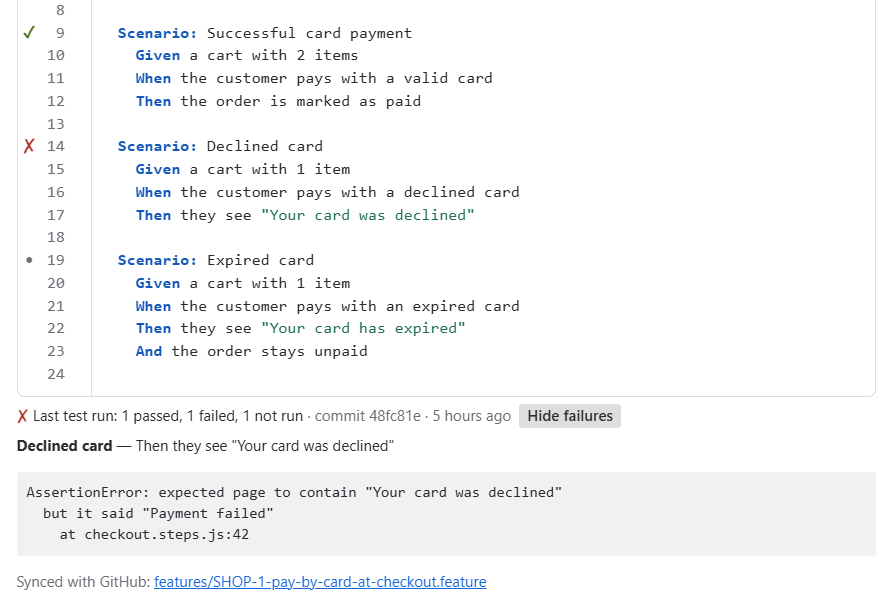
FeatureBridge (made by us, YTI Digital) shows the Gherkin scenarios on the issue and takes the Cucumber JSON report your tests already write. After each run, every scenario on the story shows its last result:
| Development panel | Automation webhook | FeatureBridge | |
|---|---|---|---|
| Result per scenario | No, per build | Only what your script posts | Yes |
| Failing step and error | No | Only what your script posts | Yes |
| Setup in CI | Integration app | Your own script | One curl step |
| Scenarios edited on the issue | No | No | Yes, synced with .feature files in Git |
The upload is one step at the end of the pipeline; it runs even when tests fail, so failures reach Jira too:
- name: Send results to FeatureBridge
  if: always()
  run: |
    curl -sS -X POST \
      -H "X-API-KEY: ${{ secrets.FEATUREBRIDGE_KEY }}" \
      -H "X-COMMIT-ID: ${{ github.sha }}" \
      --data-binary @cucumber.json \
"${{ secrets.FEATUREBRIDGE_URL }}"- Results find their issue by a tag on the feature (
@SHOP-12) or by the key in the file name (SHOP-12-checkout.feature). - Any tool that writes Cucumber JSON works: cucumber-js, Cucumber-JVM, and the Cucumber JSON formatters of other Gherkin runners.
- The project page lists every feature with its last run, so the whole team sees what fails before a release.
Coming from Behave Pro
Its upload headers are accepted as they are: change only the URL and the key. See Move from Behave Pro.
Read more: Upload CI results (GitLab CI and plain curl examples) · Keep Gherkin feature files in Git and edit them in Jira · FeatureBridge.