Guide · BDD with Jira
Keep Gherkin feature files in Git and edit them in Jira
Product owners write acceptance criteria on the Jira story; the test runner needs .feature files in the repository. Copying between the two is how scenarios drift apart. Here are the ways teams solve it.
The three usual setups
- Scenarios only in Jira (in the description or a text field). Easy for the product owner, but the test runner can't use them, and Jira's editor doesn't highlight Gherkin.
- Scenarios only in Git. Great for developers, invisible to the people who decide what the story should do.
- Both, kept in sync. The story shows the scenarios, the repository holds the files, and a change on either side reaches the other.
Test-management tools such as Xray can import feature files, but they don't keep the repository as the source of truth: people end up editing in two places.
Two-way sync between issues and .feature files
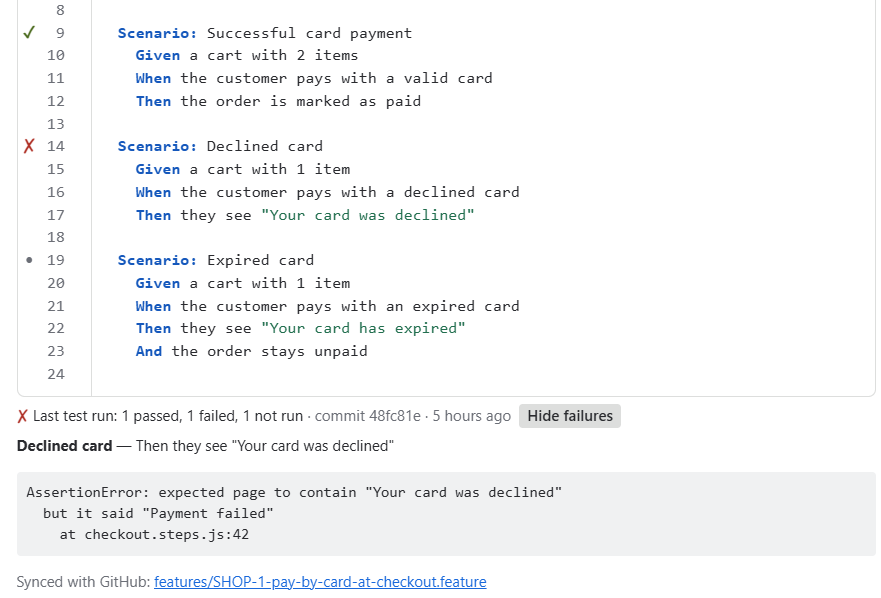
FeatureBridge (made by us, YTI Digital) puts a Scenarios panel on the issue and syncs it with one repository, branch and folder in GitHub, GitLab or Bitbucket Cloud:
- A file belongs to an issue by its name (
features/SHOP-12-checkout.feature) or by a@SHOP-12tag. - Saving on the issue commits the file to the branch within seconds; a push to the branch updates the issue.
- If both sides changed, nothing is overwritten: the panel shows the conflict and you choose.
- Upload the Cucumber JSON report from CI and every scenario shows its last result: passed or failed.
Coming from Behave Pro or a folder of feature files
Existing .feature files are linked to issues by their tags or file names, so you can connect the repository and keep working. See moving to FeatureBridge.
What to agree on as a team
- One folder, one branch for the synced files (for example
features/onmain), so test code and specs don't mix. - One feature file per story keeps the history readable on both sides.
- Who edits where: product owners on the issue, developers in the IDE; sync makes both correct.
Read more: FeatureBridge docs · how sync works · Jira settings → Apps → FeatureBridge to connect a repository.