Guide · Jira + HubSpot
How to sort Jira issues by HubSpot deal value
Your sales team tracks deals in HubSpot, your product team works in Jira. The question in every planning meeting is the same: which of these issues has the most revenue behind it? Here is how to make Jira answer it.
What Jira can do on its own
Nothing, directly. Jira sorts and filters by fields, and there is no field that knows about HubSpot. The HubSpot integrations on the Marketplace show linked deals and tickets on the issue, which helps when you are looking at one issue, but they don't give you a number you can put in ORDER BY. Jira also can't sort by linked issues or their values, so a "count the customers behind this bug" column has to come from somewhere else.
Option 1: a number field kept up to date by Automation
If you only need one number (say, the amount of one deal per issue) and you have a HubSpot plan with workflow webhooks, you can wire it yourself:
Create a number field in Jira
For exampleDeal value, and add it to the issue screens of your project.Add an Automation rule with an incoming webhook
In Jira, Project settings → Automation → Create rule, trigger Incoming webhook, action Edit work item that setsDeal valuefrom the webhook data.Call it from HubSpot
A HubSpot workflow on deals sends a webhook to that URL whenever the amount or stage changes, with the Jira issue key stored on the deal.
Where this breaks
It works for one deal per issue. It gets hard as soon as an issue matters to several customers: you need to add up several deals, drop deals that were lost, count each deal once when it is behind two issues, and keep the issue key on every deal in HubSpot. Webhook actions in HubSpot workflows also need a paid HubSpot tier.
Option 2: let an app keep the numbers
Revenue Impact for Jira (made by us, YTI Digital) links HubSpot companies, contacts, deals and tickets to issues from a panel on the issue, follows HubSpot's associations to the customers behind them, and writes three read-only number fields that work everywhere a field works: JQL, filters, boards, dashboards.
| Field | What it holds |
|---|---|
| Linked open deal value | Sum of the open deals behind the issue: linked directly, or deals of the linked customers. Each deal counted once. |
| Linked ARR | Annual recurring revenue of the customers behind the issue (closed-won deals; you choose the ARR property). |
| Linked customers | How many distinct HubSpot companies are behind the issue. |
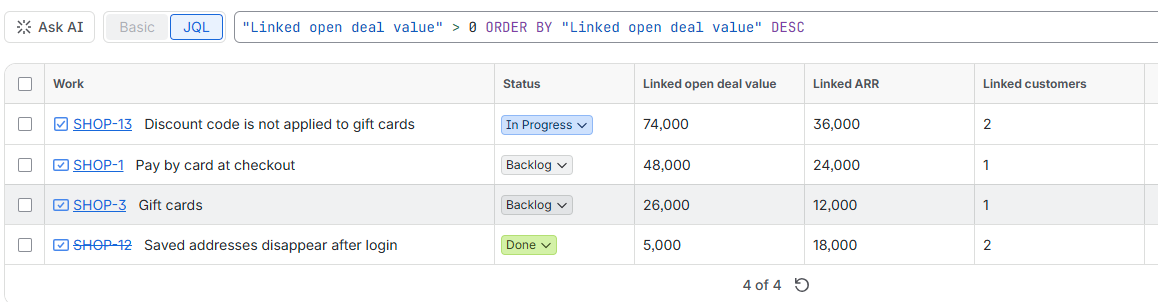
JQL you can copy
Open work with the most open deal value first:
statusCategory != Done ORDER BY "Linked open deal value" DESCBugs that block three or more customers:
type = Bug AND "Linked customers" >= 3 ORDER BY "Linked customers" DESCFeature requests from customers worth at least 50,000 a year:
type = Story AND "Linked ARR" >= 50000 ORDER BY "Linked ARR" DESCAdd the three fields as columns in the issue list or to your board's card layout, and put the Revenue at risk gadget on the team dashboard for the weekly planning meeting.
What to check before you choose
- Where the data goes. Revenue Impact runs on Atlassian Forge and calls HubSpot directly from there; there is no third-party server and the HubSpot key stays in Forge secret storage.
- Who sees amounts. Anyone who can see an issue sees its numbers, so check that this is fine for your Jira audience.
- Currency. Amounts are summed in your HubSpot company currency, as HubSpot stores them.
Read more: Revenue Impact docs · more JQL recipes · how the numbers are counted.