Guide · Jira + HubSpot
Tell the HubSpot deal owner when a Jira issue is done
A prospect asks for a feature, an account manager promises a fix. Weeks later engineering closes the Jira issue — and the person who promised it hears about it from the customer. Here is how to close that loop.
What the loop needs
- Which deals are waiting for this issue — one issue often matters to several customers.
- Who owns each of those deals — and only the open ones: a lost deal needs no follow-up.
- A nudge where sales works — a HubSpot task on the deal, not an e-mail that gets lost.
- Once — reopening and closing the issue again shouldn't send a second round.
The usual routes
| Route | How | Where it falls short |
|---|---|---|
| Jira Automation | A rule on “Issue transitioned to Done” sends an e-mail or a Slack message | Jira doesn't know which HubSpot deals wait for the issue or who owns them; you hard-code recipients |
| Zapier, Make or similar | A Jira trigger creates a HubSpot task | Needs the deal ID stored on the issue, one deal per issue, and a paid automation plan; no “only once” |
| A HubSpot workflow | Reacts to a deal property that Jira sets through an integration | Needs a paid HubSpot tier with workflows, plus something that sets the property |
| Revenue Impact for Jira | Link companies, deals or contacts to the issue; when it is done, each open deal's owner gets a task | Made by us — details below |
With Revenue Impact
Revenue Impact links HubSpot companies, deals, contacts and tickets to Jira issues and shows the open deal value and ARR behind each issue. With Tell the deal owner when it's done switched on, an issue moving to a Done status creates a HubSpot task for the owner of every open deal behind it:
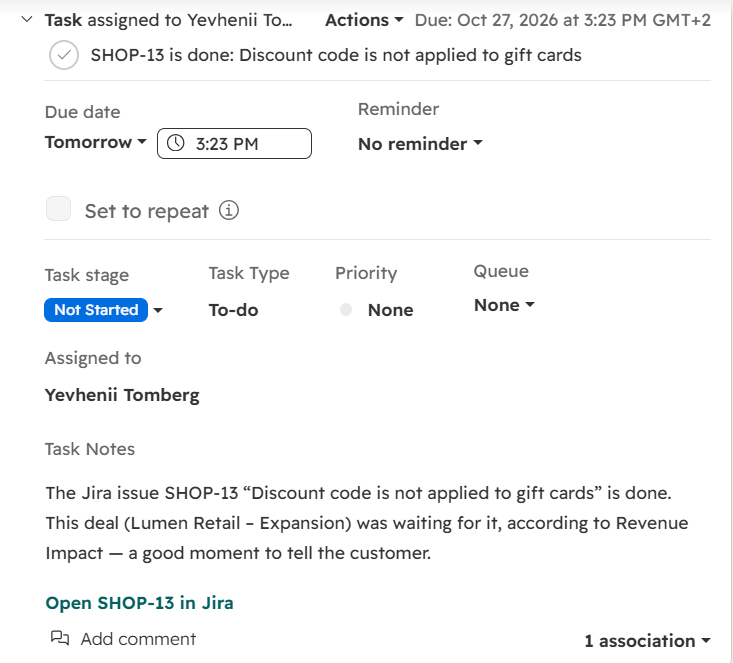
- The deals are the ones behind the issue: linked directly, plus the open deals of linked customers (if you count those).
- Each deal's owner is told once per issue; deals added later are told the next time the issue is done.
- Deals without an owner are named on the admin page instead of being skipped quietly.
- It works with the HubSpot key the app already uses: no workflows, any HubSpot plan.
The other half of the loop
Before an issue is done, the same links tell product which issues have the most revenue behind them: How to sort Jira issues by HubSpot deal value.
Read more: Tell the deal owner when it's done · Revenue Impact docs.