
Use Chatline
Time reminder
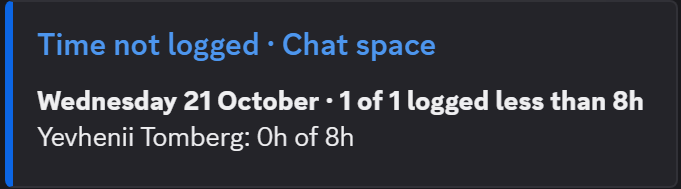
Once a day Chatline checks the work logged in Jira by the people you choose and posts who logged less than expected on the last workday.
Turn it on
On the Chatline settings page click Edit on the channel.
Under Time reminder tick Post who logged less time than expected on the last workday.
Pick the people to check (up to 100), the expected hours a day, the hour to post and the time zone.
Click Save changes, then Check logged time now on the channel to see the result at once.
How it counts
- The day checked is the last workday: yesterday, or Friday on a Monday while Weekdays only is on.
- All time a person logged in Jira for that day counts, on any issue, not only issues that match the channel's JQL filter.
- The message lists the people under the expected hours, least logged first, with what they logged: Jo Park: 2h 30m of 8h.
- When everyone logged enough, nothing is posted.
Like the daily digest, it arrives within the first few minutes of the chosen hour.
Personal data
The reminder is the only feature that keeps people: Chatline stores the Atlassian account IDs you picked, never names or email addresses. Names and hours are read from Jira when the reminder is posted. The IDs are reported to Atlassian's personal data API every week, and people who close their Atlassian account are removed automatically. See Permissions and data.