Guide · Jira + Zoom
Jira notifications in Zoom Team Chat
If your team chats in Zoom, you want new bugs, status changes and releases to show up in the right channel, without everyone getting every update. Here is what exists and what works in 2026.
What you can use today
- Zoom Notifications for Jira on the Atlassian Marketplace is free, but its listing was last updated in 2019. Check that it still connects before you rely on it.
- Jira Automation can send a web request, and Zoom's Incoming Webhook app can receive one. That works for one rule at a time, but Zoom expects its own message format and a verification token in the header, so every rule needs careful setup.
- Zapier or Make can sit in between, at a monthly cost per task.
The Incoming Webhook part (needed in every option)
In the Zoom App Marketplace find Incoming Webhook (made by Zoom) and choose Add.
In the Team Chat channel that should get Jira updates, send
/inc connect jira.Zoom answers with an endpoint and a verification token. Keep both: together they let anyone post to that channel.
Zoom admins
If the app can't be added, your Zoom account admin may have to allow apps from the Zoom App Marketplace first.
Filtered, readable notifications with Chatline
Chatline for Zoom Team Chat (made by us, YTI Digital) takes that endpoint and token and does the rest from Jira: you choose events and a JQL filter per channel, and it formats the messages for Zoom.

- A JQL filter per channel: high-priority bugs to the on-call channel, everything for a project to the team channel.
- Quick edits bundled into one message, so the channel isn't flooded when someone tidies up an issue.
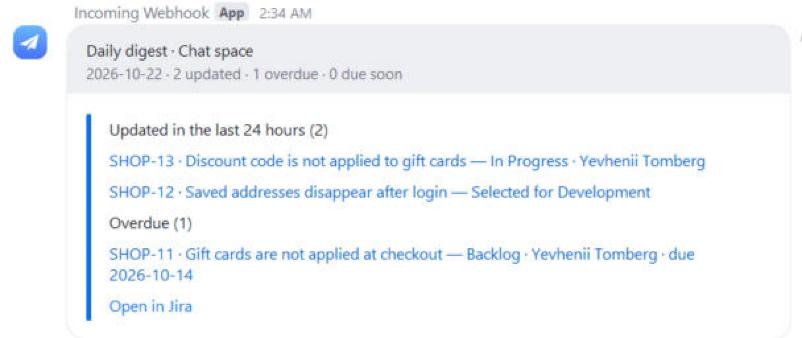
- A daily digest, sprint start and close, releases, and time-based reminders.
- A Jira Automation action for custom messages from your own rules.
- Privacy: restricted comments and issues with a security level are never posted; the endpoint and token are kept in Forge secret storage.
Which option to choose
- A single "new bug" alert: an Automation rule with the Incoming Webhook is enough.
- Several channels, filters, digests or releases: an app saves you from maintaining a rule per event.
Read more: Chatline for Zoom Team Chat docs.